Troubleshooting for Easy Anti-Cheat (EAC) Issues

Some players are currently unable to play KILLER INN due to an Easy Anti-Cheat (EAC) related issue. We sincerely apologize for the inconvenience and frustration this has caused.
Our team is investigating the root cause, and some of the following steps have resolved the issue. Please try them in order.
First, check if your Windows account type is set to "Administrator" in "Settings" → "Accounts".
- Launch KILLER INN while signed in as an "Administrator"
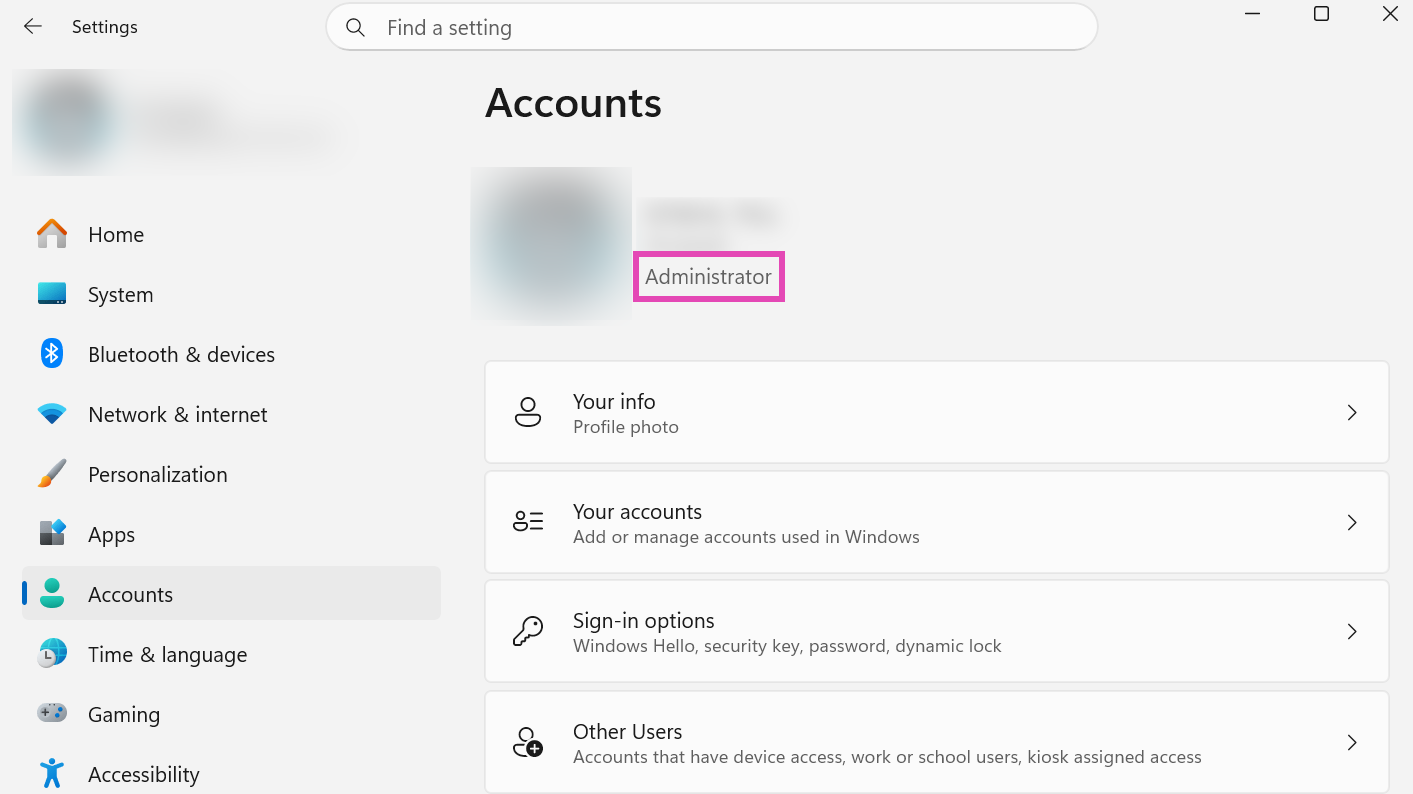
If this still does not resolve the issue, please try the following steps.
1. Close KILLER INN and wait up to 10 minutes before trying again
- Close KILLER INN completely
- Wait 10+ minutes, and launch KILLER INN again
- This will allow EAC to refresh the cache, which may resolve the issue
2. Verify game files integrity
- Ensure KILLER INN is closed
- Right-click "KILLER INN" in your Steam library, and select "Properties"
- Go to "Installed Files" and click "Verify integrity of game files"
- Steam will verify the game's files and re-download any missing or corrupted files
3. Repair EAC
- Right-click "KILLER INN" in your Steam library, and select "Manage" → "Browse local files"
- Open the "EasyAntiCheat" folder
- Click the Explorer’s address bar, type " EasyAntiCheat_EOS_Setup.exe repair", and press Enter
- If prompted, grant administrator rights
4. Restart your PC and internet connection
- Turn off both your PC and your router/modem
- Turn them back on and try launching the game again
5. Check for Windows and GPU driver updates
- Get the latest Windows updates
- Update your graphic card drivers to the latest version. Outdated driver versions may trigger false positives with EAC
6. Check your antivirus software
- Get the latest antivirus updates
- Try temporarily disabling it and see if it resolves the issue
- Check that EAC isn't being blocked by any security software. Try adding the Easy Anti-Cheat executable (.exe) to the exclusions list in your Windows Security settings
7. Check your connection to EAC
- Click the following links and check that each one displays "200 - HTTP OK"
- https://download.eac-cdn.com/
- https://download-alt.easyanticheat.net/
- If you don't see that message, your firewall may be blocking the connection. Try adding EAC and the game folder to your firewall's exception list
- If the issue persists, it may be caused by your router settings. Please contact your router manufacturer or internet service provider for further assistance
8. Perform a fresh install of KILLER INN
- A fresh install involves both uninstalling through Steam and deleting all local files
- Right-click "KILLER INN" in your Steam library, and select "Manage" → "Browse local files"
- Delete the entire "KILLER INN" folder
- Right-click "KILLER INN" in your Steam library, and select "Manage" → "Uninstall"
- Reinstall by clicking "INSTALL" in Steam
If the issue persists after trying out all of these steps, please contact us via the Support Center or our official Discord. Including a screenshot of the error message along with your system details (OS, antivirus software) will help us investigate more quickly.
The issue may also be related to Windows system file corruption, in which case Microsoft's own troubleshooting resource may also be helpful: Microsoft Q&A: Untrusted system file Easy Anti Cheat.
We apologize once again for the inconvenience this has caused, and we appreciate your patience while we work to get you back into the game.